

Movyt Studio: A video creator studio with AI that creators can trust.
I designed Movyt as a junior UI designer in 2014. In 2026, I audited it, found 40 issues, and rebuilt it around one rule: AI suggests, the creator decides.

Executive Summary
Role: Product designer, end to end (audit, research, UX, UI, design system, prototype)
Type: Concept project, 2026. AI features are simulated in the prototype.
Platform: Responsive web app for mobile, tablet and desktop, light and dark themes
Tools: Claude for exploring ideas, Lovable for building the working prototype
Prototype:
The challenge
Creators lose the most time and confidence after they stop recording: uploading, writing details, choosing a thumbnail, checking captions. AI can take much of that work off them, but only if they trust it. The hard part was not adding AI. It was deciding how much control to give it.

Constraints: I worked alone, with no research budget, and the AI in the prototype is simulated. So I treated research as hypotheses and kept every metric as a proposal.
Where it started
Movyt was one of my projects at Globussoft. The brief was simple: email login, then a way to record, upload and publish videos. I did what most junior designers did in 2014. I made it look good, followed the trends of the time, and moved on.

Looking at it again, I can see I designed screens, not a product. The app was easy to watch. It was hard to make anything with.
Auditing my own work
Before designing anything new, I audited 7 of my old screens against Nielsen's heuristics and WCAG 2.1 AA. It was not comfortable to read.

The number that stayed with me was zero. Not one error state was designed. If an upload failed, the creator had no idea what happened or whether their work was lost.
That changed the direction. The 2014 app was built around watching: Live, Recent, Following. But the weakest part was creating. So I moved the focus to the creator side, where the old app failed most. Sign-in, with multi-factor authentication, is planned but not part of this prototype.
Understanding creators
I started with a proto-persona and mapped the creator journey as a set of hypotheses to test later.

2 dips stood out. The 1st is during upload, when creators fear losing their work. The second is after editing, when they have to guess a title and thumbnail that will actually get views. Making the video was never the hard part. Everything after it was.
One principle: AI suggests, the creator decides
Creators want help, but they don't want to lose control of their own channel. So I set one rule for every AI feature:
-
Visible: the creator can always see what AI changed
-
Explained: each suggestion shows a confidence level and a short reason
-
Editable: accept, edit or reject, one click each
-
Labelled: content made by AI always says so
This rule settled most design questions before they became debates.
5 decisions that shaped it
Each of these had a faster or simpler option. I chose the one that kept the creator in control, and accepted the cost.

The reasons were simple. Creators must always know which words are theirs. Fixing a sentence is cheaper than fixing a video. One bad scene shouldn't cost four good ones. Viewers deserve to know when AI made something. And blocking creators over minor flags would push them away.
What I left out, and why
Cutting was as important as adding. Each cut kept the scope on one question: can AI make publishing faster without taking control away?
Sign-in and accounts
A solved problem. The 2014 failures were in publishing, not login. Next: sign-in with multi-factor authentication.
Viewer features
Likes, follows and the watch page belong to a viewing app, not a creator studio.
Team collaboration
My proto-persona works alone. Shared editing adds complexity before the core flow is proven.
Real AI models
A simulated AI let me test the experience without building the ML.
Monetisation
It depends on an audience and on trust, which come first.
The key flows
Create with AI
Describe the idea, answer two quick questions, approve the script and storyboard, then generate. Every step can be changed before anything costs time.
Describe: The creator sets the intent first: length, format, style and voice. AI works inside those limits, not around them.

Storyboard: Every scene is approved before any video is generated. Fixing words here costs nothing; fixing footage later costs time and credits.

Generating: Progress is shown scene by scene, so the wait feels predictable and a failure stays limited to one scene.

Preview: Nothing reaches the editor without the creator seeing it first.
Preview: Nothing reaches the editor without the creator seeing it first.

The first version Lovable built was just a chatbox. I rejected it. A chatbox hides progress and gives the creator nothing to approve.
Record and upload
These are the 2 moments where the 2014 app left creators on their own: getting a good take, and getting it uploaded safely.
Live tips on lighting, framing and audio help creators get a good take on the first try.
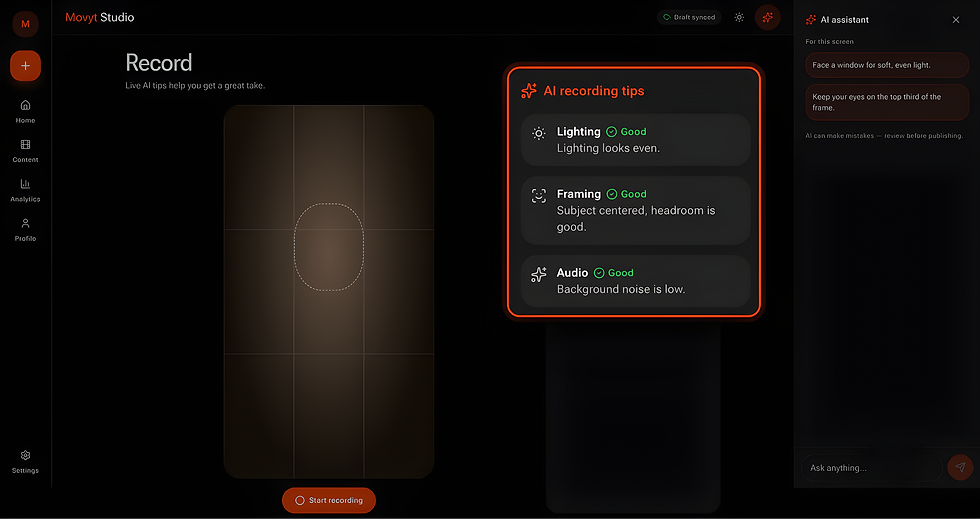
A dropped connection pauses the upload instead of failing it. The draft is already saved, so the creator just resumes.

Edit to publish
5 clear steps: Edit, Details, Thumbnail, Accessibility, Publish.
Details: AI suggests title, description and tags in a side panel. Accept, edit or reject each one.

Thumbnail: AI picks 4 frames and explains why. Creators can A/B test thumbnails and see impressions, click-through rate and confidence before choosing a winner.

Accessibility: AI writes captions and alt text. The creator must tick "I've reviewed these captions" before moving on.

Publish: a safety check flags issues. "Fix" opens the exact frame in the editor. Then publish now or schedule.

Manage and learn
After publishing, creators need 2 things: to find their work fast, and to understand how it’s doing.
Content library: Every item shows its status as both icon and text, so nothing depends on colour alone.

Actions and undo: Actions are labelled, unavailable ones are greyed out, and deleting can be undone.
Accessibility: AI writes captions and alt text. The creator must tick "I've reviewed these captions" before moving on.

Analytics: Numbers are explained in plain language, with a few AI insights on what to try next.

When AI gets it wrong
AI will be wrong sometimes, so I designed for that from the start.

A system, not just screens
I built Movyt on Material 3 Expressive with my own tokens, so the same rules work across both themes and every screen size.
Every colour pair is checked against WCAG 2.2 AA. Status never relies on colour alone; it always has an icon and text. The AI patterns (suggestion card, confidence label, AI label) are components, not one-offs. Any team adding an AI feature later gets the same behaviour for free.

Layouts follow M3 window size classes: a navigation rail on wide screens, a bottom bar on phones. The theme follows the device setting, and so does reduced motion.

How I worked with AI
I owned the design: the audit, the journey, the decisions and the system. Claude helped me explore ideas and challenge my thinking. Lovable turned my designs into a working prototype in days, not weeks.
Speed made judgement more important, not less. After every build, I reviewed each screen against heuristics and WCAG, then sent back fixes like these:
Filters allowed confusing multi-select, so I made them single-select
The record button failed contrast, so I raised it above 3:1
Video cards had no actions, so I added a menu and a detail page
Step names didn't match page titles, so I renamed every "Next" button
Bulk actions were icon-only, so I added text labels
Create with AI was a chatbox, so I turned it into a step flow
AI made building fast. It didn't make any of these calls for me.
Validation and how I'd measure it
So far this is validated by expert review only. User testing with real creators is the next step, and the plan is ready.

All metrics here are proposed, not measured. The one I'd watch most closely is the AI acceptance rate. If it's very low, the suggestions aren't good enough. If it's very high, creators may be trusting AI without reading it. The healthy number is somewhere in between, and finding it would need real data.
Where it could go
If Movyt were a real product, I'd grow it in three steps, each one earning the trust the next one needs.

How I'd bring others along
No designer ships this alone. The harder work is getting people to agree.
-
Engineering and ML: set confidence thresholds together, with real screens on the table. Make AI acceptance rate a shared goal, not a design metric.
-
Policy and legal: review the AI label and the safety check rules before build, not after launch.
-
Product: tie every roadmap phase to the goals in the challenge table, so debates use one scorecard.
-
Design: the AI pattern library is the shared base, with one owner per pattern and a weekly critique to keep it honest.
Looking back
In 2014 I asked how the app should look. In 2026 I asked what the creator is afraid of, and what AI should and shouldn't decide for them. That shift is most of what 12 years taught me.
What I'd do next:
-
Test the 3 key tasks with 5 real creators
-
Design sign-in with multi-factor authentication
-
Test the A/B and AI caption features with screen reader users